

In today's fast-paced business environment, missed calls and delayed responses can mean lost revenue and frustrated customers. An AI receptionist offers a powerful solution: 24/7 availability, instant response times, and seamless integration with your existing systems. According to an IBM Institute for Business Value report, 99% of customer care leaders expect AI to transform contact centers within three years, with improved response times and 24/7 availability cited as key benefits.
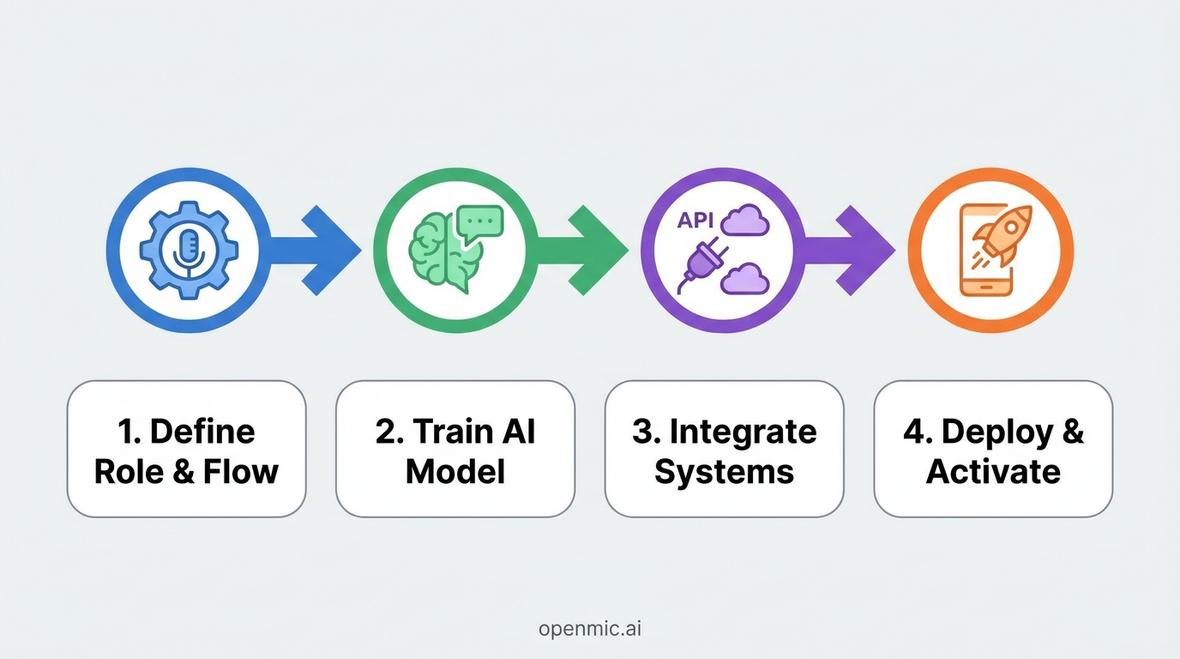
This comprehensive guide walks you through exactly how to build an AI receptionist from the ground up, covering everything from defining your use case to deployment and optimization. Whether you're a business leader looking to scale operations or a developer tasked with implementing intelligent voice automation, you'll find actionable insights to create a receptionist that truly works for your business.
Understanding AI Receptionists and Their Business Impact
An AI receptionist is an intelligent voice agent that handles inbound and outbound calls, performs tasks like appointment scheduling, answers frequently asked questions, and routes calls appropriately all without human intervention. Unlike traditional IVR systems that force callers through rigid menu trees, modern AI receptionists leverage natural language processing (NLP) and conversational AI to understand context, intent, and nuance in customer requests.
The business case for AI receptionists is compelling. They eliminate the high costs of 24/7 human staffing, reduce missed calls to zero, and provide consistent service quality regardless of call volume. For SMEs and enterprises alike, this technology represents a strategic advantage in customer responsiveness and operational efficiency.
Key capabilities that define a robust AI receptionist include:
- Natural Conversation: Understanding caller intent through advanced NLP rather than keyword matching
- Contextual Awareness: Maintaining conversation history and customer data throughout interactions
- Multi-Channel Integration: Connecting seamlessly with CRM systems, scheduling tools, and business databases
- Intelligent Routing: Knowing when to handle requests autonomously versus escalating to human agents
- Continuous Learning: Improving accuracy and effectiveness through machine learning
Step 1: Define Your AI Receptionist's Role and Conversation Flow
Before writing a single line of code or configuring any platform, you must clearly define what your AI receptionist will do. This foundational step determines everything that follows from the technology stack you choose to the training data you'll need.
Identify Primary Use Cases
Start by mapping out the specific tasks your AI receptionist needs to handle. Common use cases include:
- Appointment Scheduling: Booking, rescheduling, and confirming appointments across calendars
- Lead Qualification: Capturing prospect information and assessing sales readiness
- Customer Support: Answering common questions about products, services, hours, and policies
- Call Routing: Directing callers to the appropriate department or individual
- Information Collection: Gathering data for forms, surveys, or service requests
For healthcare practices, your AI voice agent for healthcare might prioritize appointment management and prescription refill requests. For real estate agencies, lead qualification and property inquiry handling become paramount.
Map Conversation Flows
Once you've identified use cases, create detailed conversation flow diagrams for each scenario. These flows should account for:
- Opening Greetings: How the AI introduces itself and sets expectations
- Intent Recognition: Questions or prompts that help identify what the caller needs
- Information Gathering: Sequential questions to collect necessary data
- Confirmation Steps: Repeating back information to ensure accuracy
- Handoff Protocols: Clear criteria for when to transfer to a human
- Closing Statements: Professional wrap-up and next steps
Document edge cases and exception handling. What happens if a caller provides incomplete information? How does the system handle profanity or hostility? Planning these scenarios upfront prevents frustrating user experiences later.
Step 2: Train Your AI Model with Real-World Data
The effectiveness of your AI receptionist hinges on the quality and breadth of its training. This step transforms your conversation flows into an intelligent system capable of understanding natural language and responding appropriately.
Gather Training Data
Effective training requires diverse, representative data. Sources include:
- Call Recordings: Transcripts of actual customer service calls (with proper consent and privacy compliance)
- Email and Chat Logs: Written customer inquiries that reveal common questions and phrasing
- FAQ Documentation: Your existing knowledge base and support materials
- Industry-Specific Scenarios: Typical interactions unique to your business vertical
The more varied your training data, the better your AI receptionist will handle linguistic diversity different accents, speech patterns, colloquialisms, and ways of expressing the same need.
Select Your AI and Voice Platform
You have two primary paths for building an AI receptionist: custom development or leveraging a specialized platform. Custom development using frameworks like Rasa, Dialogflow, or Amazon Lex offers maximum flexibility but requires significant technical expertise and time investment. For most businesses, especially those prioritizing speed-to-market and reliability, an API-first voice AI platform delivers better results.
Platforms like OpenMic.ai provide pre-trained conversational AI models specifically optimized for voice interactions, along with enterprise-grade infrastructure for call handling, speech recognition, and text-to-speech synthesis. This approach allows you to focus on configuring your specific use cases rather than building foundational technology.
Configure Intents and Entities
In conversational AI, an intent represents what a user wants to accomplish, while entities are the specific data points needed to fulfill that intent. For example:
- Intent: Schedule Appointment
- Entities: Date, time, service type, patient name, contact information
Train your model by providing multiple example phrases for each intent, covering various ways people might express the same request. The more training examples you provide, the more accurately your system will recognize caller intent even when phrasing differs from your templates.
Step 3: Integrate with Your Business Systems
An AI receptionist that operates in isolation provides limited value. True power comes from seamless integration with your existing technology stack CRM systems, scheduling tools, databases, and communication platforms.
CRM and Database Integration
Connecting your AI receptionist to your CRM ensures every interaction is logged, customer context is available, and data flows bidirectionally. Critical integrations include:
- Contact Lookup: Retrieving customer history when a known number calls
- Lead Creation: Automatically generating new CRM records for first-time callers
- Activity Logging: Recording call summaries, outcomes, and follow-up tasks
- Data Updates: Capturing new information and updating existing records
Popular CRM platforms like HubSpot, Salesforce, Pipedrive, and Zoho all offer API access. If you're using HubSpot, Pipedrive, or similar systems, ensuring your AI receptionist can read from and write to these platforms is essential.
Calendar and Scheduling Integration
For businesses where appointment booking is central, calendar integration determines success. Your AI receptionist should be able to:
- Check real-time availability across multiple calendars
- Book appointments while avoiding conflicts
- Send confirmation emails and SMS messages
- Handle rescheduling and cancellations with appropriate logic
Integration with Google Calendar, Microsoft Outlook, Calendly, or Acuity Scheduling enables this functionality. The appointments booking agent use case demonstrates how sophisticated this workflow can become.
Communication Channel Integration
Your AI receptionist should connect with all the channels your business uses to communicate:
- Phone Systems: SIP trunks, VoIP providers, or existing PBX infrastructure
- SMS/Text: Sending confirmations, reminders, and follow-ups via text
- Email: Automated email responses and record-keeping
- Collaboration Tools: Slack, Microsoft Teams, or similar platforms for internal notifications
Modern integration platforms like Zapier make connecting disparate systems straightforward. OpenMic's Zapier integration enables connectivity with over 8,000 applications without custom API development.
Step 4: Deploy, Test, and Activate Your AI Receptionist
With your AI receptionist built and integrated, deployment requires careful testing and gradual rollout to ensure quality before going live with all traffic.
Comprehensive Testing
Conduct multi-phase testing before full deployment:
- Unit Testing: Verify each conversation flow works as designed in isolation
- Integration Testing: Confirm data flows correctly between all connected systems
- User Acceptance Testing: Have team members place test calls and evaluate the experience
- Stress Testing: Simulate high call volumes to ensure infrastructure scalability
- Edge Case Testing: Deliberately try to break the system with unusual inputs
Document every issue discovered and resolve them before proceeding. Pay special attention to latency voice AI systems require low-latency responses to feel natural. Acceptable latency standards for voice interactions typically fall below 300 milliseconds for optimal user experience.
Soft Launch and Monitoring
Begin with a soft launch, routing a percentage of calls to your AI receptionist while maintaining human backup. This approach allows you to:
- Identify issues with real traffic without risking customer satisfaction
- Gather performance data on accuracy, completion rates, and user satisfaction
- Make adjustments based on actual usage patterns
- Build confidence in the system before full deployment
Implement comprehensive monitoring and analytics to track key performance indicators like call completion rate, average handling time, escalation rate, and customer satisfaction scores.
Full Deployment and Optimization
Once soft launch testing validates your system, proceed to full deployment. However, deployment isn't the end it's the beginning of an optimization cycle:
- Continuous Monitoring: Track performance metrics daily to identify degradation or issues
- Regular Model Updates: Retrain your AI with new conversational data to improve accuracy
- Feature Expansion: Gradually add new capabilities based on user needs
- User Feedback: Actively solicit and incorporate feedback from both customers and staff
The most effective AI receptionists evolve continuously, becoming more capable and natural over time as they learn from real interactions.
Advanced Considerations for Enterprise-Grade AI Receptionists
Security and Compliance
For industries handling sensitive information particularly healthcare, finance, and legal services security and regulatory compliance are non-negotiable. Ensure your AI receptionist implementation addresses:
- Data Encryption: End-to-end encryption for all voice data and customer information
- HIPAA Compliance: For healthcare applications, Business Associate Agreements and proper safeguards
- PCI Compliance: Secure handling of payment card information if processing transactions
- GDPR/Privacy Laws: Proper consent, data retention policies, and right-to-deletion workflows
Multilingual Support
For businesses serving diverse populations, multilingual capability expands your addressable market significantly. Modern AI platforms support dozens of languages with varying degrees of fluency. When implementing multilingual support:
- Prioritize languages based on your customer demographics
- Ensure cultural appropriateness in conversational design, not just literal translation
- Test extensively with native speakers to identify awkward phrasing or misunderstandings
- Consider accent variations within the same language
Voice Selection and Personality
The voice your AI receptionist uses significantly impacts user perception and brand alignment. Consider factors like:
- Gender: Does your brand identity suggest a particular voice gender?
- Accent: Regional accents can increase relatability or project sophistication
- Tone: Professional, friendly, authoritative, or empathetic
- Speaking Rate: Faster for efficiency-focused contexts, slower for complex information
Many platforms offer custom voice cloning, allowing you to create a unique voice that represents your brand exclusively.
Industry-Specific AI Receptionist Applications
Different industries require specialized approaches to AI receptionist implementation:
Healthcare and Medical Practices
Medical offices benefit enormously from AI receptionists handling appointment scheduling, prescription refill requests, and basic patient inquiries. The technology reduces administrative burden on staff while ensuring no patient call goes unanswered. Specialized requirements include HIPAA compliance and integration with electronic health record (EHR) systems.
Real Estate
Real estate agencies use AI receptionists for lead qualification, property inquiry handling, and showing coordination. The system can capture buyer/renter criteria, match them against available inventory, and schedule property viewings all without agent involvement until a qualified prospect is identified.
Automotive Dealerships
Car dealerships leverage AI voice agents for service appointment booking, sales inquiry qualification, and test drive scheduling. The technology handles both inbound inquiries and outbound follow-up calls, dramatically improving lead response times and service department efficiency.
Legal Firms
Law firms use AI receptionists for initial client intake, appointment scheduling, and case information collection. The system ensures potential clients receive immediate response while capturing detailed information that helps attorneys prepare for consultations more effectively.
Cost Considerations and ROI
Understanding the economics of building an AI receptionist helps justify the investment. Costs typically fall into several categories:
- Platform Fees: Monthly or per-minute charges from your voice AI provider
- Development Costs: Internal resources or external consultants for configuration and integration
- Telephony Costs: Phone number provisioning and per-minute calling charges
- Integration Costs: API development or middleware for connecting business systems
- Ongoing Optimization: Continuous improvement and model retraining
Compare these costs against the expense of human receptionists working 24/7 shifts, missed call opportunity costs, and the customer satisfaction improvements measurable through reduced wait times and increased availability. Most businesses achieve positive ROI within 3-6 months of deployment.
Common Pitfalls to Avoid
Learning from others' mistakes accelerates your success. Common pitfalls in building AI receptionists include:
- Over-Complexity: Attempting to handle every possible scenario from day one rather than starting focused
- Insufficient Training Data: Expecting good performance with minimal conversation examples
- Ignoring Edge Cases: Failing to plan for unusual inputs or system failures
- Poor Handoff Experience: Frustrating users when transfer to humans is necessary but poorly executed
- No Continuous Improvement: Treating deployment as the finish line rather than the starting point
- Neglecting User Feedback: Ignoring what actual users tell you about their experience
Future Trends in AI Receptionist Technology
The field of conversational AI continues advancing rapidly. Emerging trends that will shape AI receptionists include:
- Emotion Detection: Recognizing caller emotional state and adapting responses accordingly
- Predictive Engagement: Proactively reaching out based on customer behavior patterns
- Multimodal Interaction: Combining voice with visual elements through video calls or screen sharing
- Advanced Personalization: Remembering individual preferences and tailoring interactions accordingly
- Autonomous Problem-Solving: Moving beyond information provision to actively resolving issues
Staying current with these developments ensures your AI receptionist remains competitive and continues delivering value as technology evolves.
Frequently Asked Questions
How long does it take to build an AI receptionist?
Timeline varies based on complexity and approach. Using a platform like OpenMic.ai, basic implementations can go live in 1-2 weeks. Custom-built solutions typically require 2-4 months for development, testing, and deployment. Factor in additional time for integration with complex enterprise systems.
Do I need coding skills to build an AI receptionist?
Not necessarily. Modern no-code AI agent platforms enable business users to configure sophisticated voice agents through visual interfaces. However, complex integrations and customizations may benefit from developer involvement.
What's the difference between an AI receptionist and an IVR system?
Traditional IVR (Interactive Voice Response) systems use rigid menu trees and simple keyword recognition. AI receptionists leverage natural language understanding to have genuine conversations, understand context, and handle complex requests without forcing callers through multiple menu levels.
Can AI receptionists handle multiple languages?
Yes, modern AI platforms support multilingual interactions, with some supporting 50+ languages. Quality varies by language, with major languages like English, Spanish, French, and Mandarin typically offering the most sophisticated capabilities.
What happens when the AI can't handle a request?
Effective AI receptionists recognize their limitations and smoothly transfer to human agents when necessary. The system should pass along conversation context so humans don't need to ask customers to repeat information. Designing clear escalation protocols is essential for maintaining positive user experience.
How do I measure AI receptionist success?
Key metrics include call completion rate, average handling time, escalation rate to humans, customer satisfaction scores, cost per interaction, and business outcomes like appointments booked or leads qualified. Comparing these metrics against baseline human performance provides clear ROI visibility.
Conclusion
Building an AI receptionist represents a strategic investment in operational efficiency and customer experience. By following the four-step process defining role and flow, training your AI model, integrating business systems, and deploying with continuous optimization you create an intelligent voice agent that transforms how your business handles communications. The technology has matured to the point where implementation is accessible to businesses of all sizes, with platforms offering both no-code configuration and deep API access for custom requirements. Whether you're looking to reduce costs, improve response times, or scale operations without proportionally increasing headcount, an AI receptionist delivers measurable ROI while freeing your team to focus on higher-value activities. Start with focused use cases, iterate based on real-world performance, and continuously expand capabilities as your system proves its value.